Powering a Triple 8-Pin GPU: Safe Cabling with the be quiet! Pure Power 13 M 1000W

PCIe Power Connectors: Legacy and New Standards
Graphics cards draw extra power from dedicated PCIe cables that run from your PSU. There are two generations of these connectors, and knowing the difference matters when you are buying cables or planning a high-power build.
The legacy 6-pin and 8-pin connectors
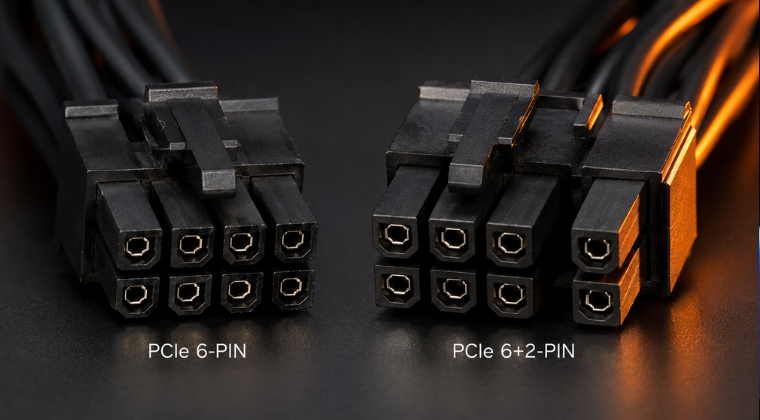
The 6-pin connector is rated at 75 W. The 8-pin, also called 6+2 pin, is rated at 150 W per connector. The 6+2 pin format means the cable can physically fit both 6-pin and 8-pin sockets on a GPU, which is why most modern PSU cables ship in this combined format. High-end cards pull far more than 150 W though, so three or more connectors are often required.
The new 12VHPWR and 12V-2×6 connectors
In 2022, NVIDIA and PCI-SIG introduced the 16-pin 12VHPWR connector as part of the ATX 3.0 and PCIe 5.0 specification. It has twelve power pins and four sense pins, and can deliver up to 600 W through a single cable. The updated ATX 3.1 standard in 2023 refined this slightly into what is called the 12V-2×6 format. It is electrically the same but keyed differently on the GPU end. On the PSU end, a native 12V-2×6 cable still splits into two separate 8-pin plugs.
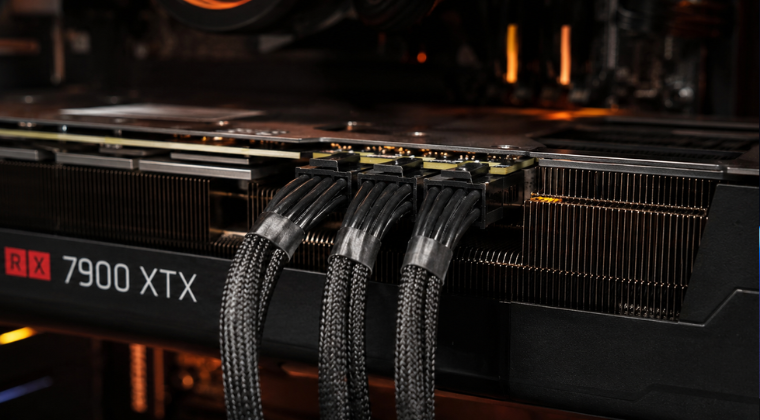
So in practice, modern high-end GPUs either use a single 12+4 pin input or multiple 8-pin inputs. AMD RX 9000 series cards, including the ASUS Radeon RX 9070 XT Prime OC, mostly still use 6+2 pin connectors, with top models requiring three of them for up to roughly 450 W.
If you are unsure how much power your GPU draws or which connectors it needs, check the manufacturer spec sheet before buying cables. The GPU box will also list the power connector requirements clearly.
be quiet! Pure Power 13 M 1000W: What Cables Come in the Box
The be quiet! Pure Power 13 M 1000W is a fully modular, ATX 3.1 compliant PSU running on a single 12V rail at 83.4 A. That single rail design means you do not need to worry about balancing load across multiple rails, which keeps things simple.
What is included
Out of the box you get the following PCIe cables:
- One 12+4 pin 12V-2×6 cable rated at 600 W, with two 8-pin plugs on the PSU end. This is for next-gen GPUs or adapters.
- One dual-head 6+2 cable with two connectors. The first connector sits at around 50 cm, the second at 15 cm further along.
- Two single-head 6+2 cables, each around 60 cm long.
In total that gives you four 6+2 pin ends and one 12+4 pin end. For a GPU that needs three 8-pin connectors, this is more than enough without buying anything extra.
How the PSU ports are laid out
On the back of the PSU there is one dedicated 12+4 port for the ATX 3.1 cable, and two 12-pin ports for the standard 6+2 cables. The dual-head cable plugs into one of the 12-pin ports. A single-head cable plugs into the other. Both 8-pin plugs of the 12+4 cable must always be connected to the PSU when using that connector, which is a requirement of the ATX 3.1 spec.
All be quiet! modular cables are keyed for their own PSUs. Do not use cables from a different brand, even if they appear to fit physically. Incorrect pinouts can cause serious damage.
Safe Wiring for a GPU with Three 8-Pin Inputs
When your GPU needs three 6+2 connectors, there is a straightforward and safe way to do it with the Pure Power 13 M.
The recommended approach: two cables, three connectors
Use the dual-head cable to supply two of the GPU’s 8-pin sockets. Then use one of the single-head cables for the third socket. That gives you three connectors running across two separate cable runs. Under full load, each cable carries roughly 150 to 200 W, which is well within the capacity of a properly rated 18 AWG PCIe cable.
This is the correct way to do it. It spreads current across two cables and two ports on the PSU, rather than concentrating everything through one path.
What about using three separate cables?
If you wanted to use three individual single-head cables, one per GPU connector, that is also fine and slightly better in theory. The Pure Power 13 M includes two single-head cables, so you would need to source a third. For most builds the two-cable approach works perfectly well.
Can you use the 12+4 cable with an adapter instead?
Yes. If your GPU has three 8-pin inputs and your PSU only has a 12+4 output available, a 12+4 to 3×8-pin adapter cable will work. Brands like CableMod and SAMA make these. That said, with the Pure Power 13 M you already have the native 6+2 cables needed, so an adapter is not necessary here.
Avoid running all three GPU connectors from a single cable if you can help it. It concentrates the load on one cable run and one PSU port, which is not best practice even if it technically works.
For a deeper look at daisy-chain cabling and when it is acceptable, take a look at our guide to daisy-chain PCIe power cables.

Step-by-Step: Connecting a Three 8-Pin GPU
Here is the process for connecting a GPU like the ASUS Radeon RX 9070 XT to the Pure Power 13 M 1000W.
- Identify your cables. Find the dual-head 6+2 cable and one single-head 6+2 cable from the PSU accessory bag.
- Connect to the PSU first. Plug the dual-head cable into one of the two 12-pin PCIe ports on the back of the PSU. Plug the single-head cable into the other 12-pin port. Press each plug in firmly until it seats fully.
- Connect to the GPU. Take the two free 6+2 ends from the dual-head cable and plug them into two of the GPU’s three 8-pin sockets. Then plug the single-head cable into the third socket.
- Tuck away the spare end. The dual-head cable has one unused connector. Fold it back and secure it away from the GPU cooler and fans. Do not leave it hanging loose.
- Check every connector. Each plug should click into place. Give each one a gentle tug to confirm it is seated. A loose connector is a genuine fire risk under load.
- Boot and verify. Power on and check that the GPU is reporting correctly in your system. If you see undervoltage warnings or instability, power down and recheck each connection.
Always connect cables to the PSU end before powering on. Never force a connector. If it does not seat easily, check you have the right cable for that port.
Thermal and Electrical Safety
Getting the connectors right is only part of the job. Keeping everything safe under load matters just as much.
Cable temperature
Under 200 to 300 W of draw, a quality 18 AWG cable may feel slightly warm but should not be uncomfortably hot. After your first long gaming session, carefully feel each cable near the connector. If anything is too hot to hold, or if you smell burning insulation, power down immediately and inspect every connection.
Routing and airflow
Route cables so they do not sit directly in front of the GPU fans. Do not coil cable tightly near the connector end. Bending a cable sharply right at the plug can stress the pins and damage the connection over time. Use cable ties to keep things tidy, but do not cinch them so tight that the wire bends at a hard angle.
Connector seating
An incompletely seated connector is the most common cause of overheating at the GPU power input. Always press until you hear and feel a click. On the PSU side, the same rule applies. The ATX 3.1 spec is clear that both 8-pin plugs on the PSU end of a 12+4 cable must be fully connected, not just one.
Grounding and mains supply
Make sure your mains outlet is properly earthed and that you are using a decent quality surge-protected extension if needed. Unstable mains power can cause rail fluctuations that look like GPU instability but are actually a supply issue.
Never modify connector pins, force a plug that does not fit, or use damaged cables. If a connector or cable looks burnt or deformed, replace it before using the system again.
Recommended Cables and Where to Buy
For the Pure Power 13 M and similar be quiet! PSUs, stick to cables that are either supplied in the box or sold officially by be quiet!. Here are the main options worth knowing about.
be quiet! official cables
- CP-6610 (single 6+2 pin): A single connector cable for one PCIe socket. Useful if you want a third individual cable run rather than using the dual-head option.
- CP-6620 (dual 6+2 pin): The dual-head version. This is the same type included in the box with the Pure Power 13 M.
- be quiet! 12VHPWR cable (12+4 pin): Available in straight and 90-degree versions. Rated at 600 W and designed for ATX 3.1 PSUs. Useful if you upgrade to a GPU that uses the 12V-2×6 input.
These are available from the official be quiet! store, Amazon UK, Overclockers UK, and Scan.
Adapters
If you ever find yourself in a situation where your PSU has a 12+4 output but your GPU needs three 8-pin connectors, a 12+4 to 3×8 pin adapter cable is the solution. CableMod and SAMA both produce these. Only use well-reviewed, quality-rated adapters and follow the fitting instructions carefully.
Third-party sleeved cables
CableMod produces individually sleeved cable kits compatible with be quiet! PSUs. These are a good option if you want a cleaner look or are running a longer cable run in a large case. Make sure you select the correct cable kit for your specific PSU model.
Avoid cheap unbranded PCIe cables from unknown sellers. The savings are not worth the risk. If a cable is not rated for the power you are running through it, the consequences can be severe.
If you are still deciding on the right PSU for your build, our guide on what PSU you need for your PC covers wattage, connectors, and efficiency ratings in plain terms.
Troubleshooting Common Power Issues
If your system is not behaving as expected after installing a high-power GPU, work through these checks before assuming a component is faulty.
No power or no boot
Reseat every PCIe connector at both ends. Check the PSU rocker switch is on. Confirm the 24-pin motherboard connector and CPU power are also fully seated. A single loose connector anywhere in the chain can prevent the system from posting.
Reboots under load
This usually points to a power delivery issue. Check that you are not running all three GPU connectors from a single cable. Try swapping which connectors are used on the dual-head cable. If the problem persists, verify the PSU is rated for the full system load, not just the GPU alone.
Visual artefacts or instability
Artefacts can indicate undervoltage reaching the GPU. Make sure each connector is fully seated. If you are using an adapter, confirm both ends are fully clicked in. Update GPU drivers and check manufacturer firmware notes, as some early driver versions can cause false power limit trips.
Connector or cable overheating
Power down immediately. Inspect the connector for discolouration, melted plastic, or bent pins. A hot connector almost always means a poor connection causing resistance. Do not continue using a damaged connector or cable.
PSU protection circuit tripping
On a single-rail PSU like the Pure Power 13 M this is uncommon unless you are genuinely exceeding the rated output. If it is happening, check your total system power draw and consider whether the PSU is correctly sized for the build. Our what PSU you need for your PC can help you work this out.
Summary: Triple 8-Pin Cabling Done Right
Powering a GPU with three 8-pin connectors is straightforward when you have the right PSU and understand how to use its cables correctly.
With the be quiet! Pure Power 13 M 1000W you have everything you need in the box. Use the dual-head 6+2 cable for two of the GPU’s connectors, and one of the single-head cables for the third. That distributes the load across two cable runs and two PSU ports, which is the correct and safe approach. No adapters, no extra purchases, no compromises.
The key things to remember are simple. Always seat connectors fully until they click. Never run all three connectors from one cable if you can avoid it. Use only cables rated and designed for your PSU. Check for heat after the first session under load.
The ATX 3.1 standard and the single-rail design of the Pure Power 13 M make this easier than it used to be. There are no multi-rail balancing concerns, and the included cables are well specified for the job. Stick to quality components, follow the steps in this guide, and your build will be reliable.
For more information on be quiet! PSUs and which model suits different build types, read our breakdown of be quiet!, covering Pure Power, Straight Power, and Dark Power in detail.