The short answer
A laptop for a teenager doesn't need to be expensive. Homework at secondary school is mostly typing, research, slides and video calls, and any modern laptop with a proper SSD does that well. What matters more is a comfortable keyboard, a battery that lasts, a weight they will actually carry, and enough memory that it still feels quick in three years' time.
Our picks, all new, all in stock and all with Windows 11:
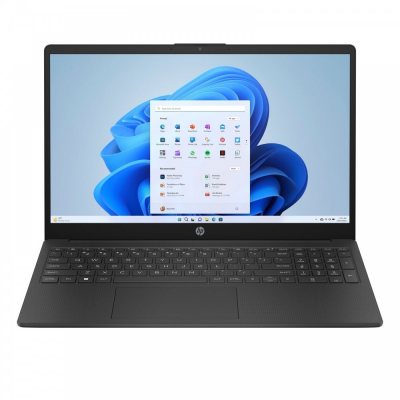
- Tightest budget: the HP 15-fc0045na at £434.99 with free delivery.
- Room to grow: the HP 255 G10 at £470.99 with free delivery, with a spare memory slot and a spill-resistant keyboard.
- Light enough to carry every day: the Lenovo ThinkBook 14 G7 at £670.99 with free delivery.
- 16GB of memory, sixth form and beyond: the Acer Aspire Lite at £700.99 with free delivery.
Delivery: £4.99 tracked UK delivery per order, and free when the order is £150 or more, so every laptop here ships free. For Christmas, order by 3pm on Tuesday 22 December for delivery on Wednesday 23 December. See our Christmas delivery dates.
What secondary schools actually need
Before you buy, ask the school (or check its website or parent app) which system it uses. Almost every UK secondary school uses one of two:
- Microsoft 365: Word, PowerPoint, Excel, OneNote and Teams. Many schools give pupils a free Microsoft 365 account, so check before you pay for Office. The apps also run in a web browser.
- Google Workspace and Google Classroom: Docs, Slides and Classroom all run in the Chrome browser, which works on Windows laptops too.
Either way, the laptop mostly runs a browser, an office app and a video call. That is light work. What slows a cheap laptop down is having lots of browser tabs open, Teams running in the background and a music app on top, and that is where memory matters more than the processor.
A few things are worth asking about, because they can change what you buy:
- Does the school have a bring your own device scheme? Some schools list approved models or require a certain operating system.
- Does any subject need special software? Design and Technology, Media or Photography sometimes use Windows programs. These won't run on a Chromebook.
- Will it go to school every day? If yes, weight, battery and a padded bag matter far more than speed.
Laptop for homework: the spec that matters
| Part | What to look for | Why |
|---|---|---|
| Memory (RAM) | 8GB minimum, 16GB if you can | Lots of tabs plus Teams fills 8GB quickly. 4GB is too little for Windows 11 |
| Storage | 256GB SSD or more | An SSD makes it start and open apps quickly. Avoid 64GB or 128GB eMMC storage |
| Processor | A recent AMD Ryzen 3 or 5, or Intel Core i3, i5 or Core 3 and up | All of these are comfortable for schoolwork |
| Screen | 14 or 15.6 inch, Full HD (1920 x 1080), anti-glare | Sharp enough for long essays and two windows side by side |
| Battery | Maker's figure of 7 hours or more | Real-world use is usually shorter than the figure on the box |
| Weight | About 1.4 to 1.6kg | A 15.6 inch laptop is fine on a desk; a lighter 14 inch is kinder on a school bag |
| Camera | Privacy shutter is a bonus | A simple slider that covers the webcam when it is not in use |
About 16GB of memory. At this price almost every new laptop comes with 8GB. That is fine for schoolwork today. The difference is what happens later: some laptops have their memory built onto the board, so 8GB is all they will ever have, while others have a free slot so more memory can be added for a modest cost. If you can't stretch to 16GB now, a laptop with a spare memory slot keeps the option open. We say which is which in our picks below.
Our laptop picks for teenagers
Every laptop here is new, comes with Windows 11, and is priced fairly against other UK shops on the day we checked. The reasons come from each manufacturer's own specifications.
| Laptop | Memory | Can add memory? | Screen | Weight | Price |
|---|---|---|---|---|---|
| HP 15-fc0045na | 8GB | No | 15.6 inch Full HD | 1.59kg | £434.99 with free delivery |
| HP 255 G10 | 8GB | Yes, 2 slots | 15.6 inch Full HD IPS | 1.52kg | £470.99 with free delivery |
| Lenovo V15 G5 | 8GB | Yes, up to 32GB | 15.6 inch Full HD TN | 1.61kg | £522.99 with free delivery |
| Lenovo ThinkBook 14 G7 | 8GB | Yes, up to 64GB | 14 inch 1920 x 1200 IPS | 1.38kg | £670.99 with free delivery |
| Acer Aspire Lite | 16GB | No, 16GB is the maximum | 15.6 inch Full HD IPS | 1.75kg | £700.99 with free delivery |
Specifications and battery figures are from each manufacturer. Battery life depends on use. See all laptops in stock.
Best laptop for GCSE students
GCSE exams are still mostly sat on paper, so a laptop is for revision, coursework and homework rather than the exams themselves. What helps in Years 10 and 11:
- A good keyboard and a Full HD screen for long pieces of coursework.
- Computer Science: Python and the other tools used at GCSE run happily on any laptop here. A Windows laptop is easier than a Chromebook if they need to install programs.
- Design and Technology, Art and Media: if the school uses Windows software for design, photo or video work, 16GB of memory makes a real difference. The Acer Aspire Lite is our pick for this.
- Revision: revision websites, flashcard apps and past papers all run in a browser.
If they are moving on to A levels or college in a year or two, buy a little more than they need now. Memory is the part they will run out of first, which is why we point out the laptops with a spare memory slot.
Windows laptop or Chromebook?
Chromebooks run Google's ChromeOS. Everything happens in the Chrome browser, they start quickly and they are simple to look after. If the school runs Google Classroom and your teenager only needs the browser, a Chromebook can be enough.
The catches:
- They don't run Windows programs. That rules them out for some coursework software and most PC games.
- Cheap models are often weak: 4GB of memory and 64GB of eMMC storage are common.
- They have an update end date. After Google's Auto Update Expiration date, the Chromebook stops getting security updates. Check it before you buy.
To be straight with you: we do sell Chromebooks, but our prices on them are not competitive with other UK shops at the moment, so we are not recommending any of ours. If a Chromebook suits your child, buy one elsewhere and check the update date. Our new, refurbished or Chromebook guide explains the choice in more detail.
For most families we would choose Windows: it runs Microsoft 365, Google Classroom in Chrome, and any program a subject teacher asks for.
Parental controls with Microsoft Family Safety
Windows 11 has free parental controls built in, called Microsoft Family Safety. You set it up with your own Microsoft account and a child account for them, then manage it from family.microsoft.com or the Family Safety app on your phone. You can:
- Set screen time limits for the laptop, for example a daily allowance or a bedtime cut-off.
- Limit apps and games one by one, and block games above an age rating.
- Filter websites and see recent searches. The web filter works in Microsoft Edge, so you can block other browsers if you use it.
- Get weekly activity reports by email.
Set it up before you hand the laptop over: it is much easier than adding rules afterwards. Do talk to them about it too. Controls work best for younger teenagers as a safety net, not as a secret, and older teens will usually find a way round anything that feels unfair.
Two more simple habits: keep the laptop in a shared room for younger children, and let Windows Update run so security fixes go on automatically.
A bag, a mouse and other extras
Laptops that go to school get dropped, rained on and squashed under PE kit. A padded bag is the cheapest insurance you can buy.
For a 14 inch laptop like the ThinkBook, the Hama Neoprene 14.1 inch sleeve at £12.99 (£17.98 delivered) slips inside an existing school bag. See all laptop bags and sleeves.
A cheap wireless mouse makes long homework sessions easier than a touchpad. The Genius NX-7000 at £10.99 (£15.98 delivered) suits either hand and its receiver stores inside the mouse. Our wireless mouse guide covers the rest.
Want to make it personal? A personalised mouse mat with their photo or name is £14.99 (£19.98 delivered). Order by 16 December for Christmas.
How we chose
We only recommend products we can sell at a fair price. For each laptop we compared our delivered price with other UK shops selling the same model, and left out anything well above the market, which is why there are no Chromebooks or refurbished laptops here. We have not tested these laptops ourselves; every spec comes from the manufacturer. Stock and prices on this page update automatically.
More guides: Best Laptop for Elderly Parents UK 2026: Easy to Use · Windows 10 End of Support: What to Do Now (UK 2026) · A Laptop for Christmas: New, Refurbished or a Chromebook?
Frequently asked questions
How much should I spend on a laptop for a teenager?
For schoolwork, around £430 to £550 buys a new Windows laptop with 8GB of memory and an SSD that will last through secondary school. Spending around £700 gets 16GB of memory, a lighter build or both, which helps for GCSE coursework, sixth form and college.
Is 8GB of RAM enough for school?
Yes, for homework, Microsoft 365, Google Classroom and Teams. It gets tight with lots of browser tabs and apps open at once. If you buy 8GB, a laptop with a spare memory slot lets you add more later.
Does my child need Microsoft Office?
Check with the school first. Many schools give pupils a free Microsoft 365 account, and Word, PowerPoint and Excel also run in a web browser. Schools that use Google Classroom work entirely in the browser.
Is a Chromebook OK for secondary school?
It can be, if the school uses Google Classroom and your child only needs a browser. It will not run Windows programs, and you should check its Auto Update Expiration date. For most families a Windows laptop is the safer choice.
What technology does an 11 year old need for secondary school?
Usually not much at the start of Year 7. Many schools set homework online, so a shared family computer or a basic laptop with a browser is enough. A laptop of their own becomes more useful from Year 9 and for GCSEs. Ask the school what it expects before you buy.
How do I set up parental controls on a Windows laptop?
Use Microsoft Family Safety, which is free. Create a child Microsoft account, add it to your family group at family.microsoft.com, and sign them in to the laptop with that account. You can then set screen time limits, filter websites in Edge and limit apps and games.