The short answer: which wireless mouse should you buy?
Most people need a comfortable mouse that connects the way their computer prefers and doesn't eat batteries. Here are our picks by what you use it for. Every one is in stock, and the price shown includes delivery.
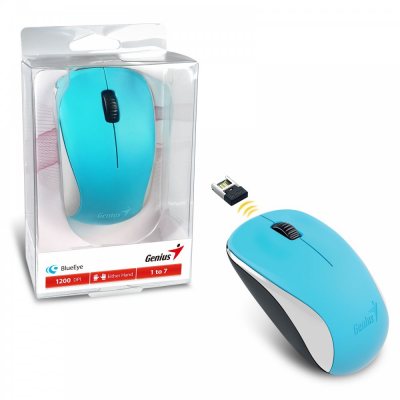
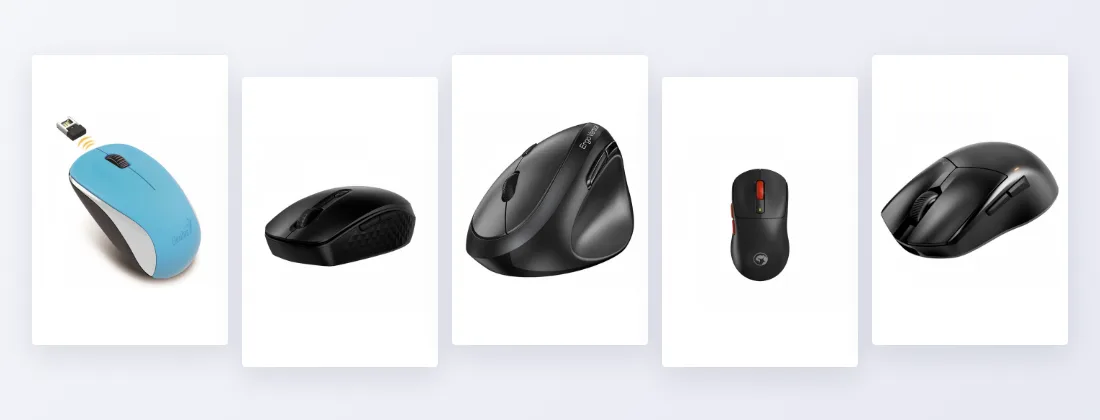
- Cheap and simple: the Genius NX-7000 at £10.99 (£15.98 delivered). It has a tiny USB receiver that stores inside the mouse, and an ambidextrous shape for either hand.
- For a laptop, or more than one device: the HP 425 at £14.99 (£19.98 delivered). It's Bluetooth 5.3 with no receiver, pairs with up to three devices, and HP quotes up to 24 months on one AA battery.
- Quiet office mouse: the Genius Ergo 8230S at £17.99 (£22.98 delivered). It has silent clicks, a shaped grip with thumb and finger rests, and forward and back buttons.
- Vertical mouse for wrist comfort: the Genius Ergo 8350S at £21.99 (£26.98 delivered). It has a 55° handshake angle and silent clicks, and works over Bluetooth or a USB receiver.
- Budget gaming: the Marvo G964W Niro 60 at £18.99 (£23.98 delivered). It connects by receiver, Bluetooth or USB-C cable, has a PixArt sensor and a built-in rechargeable battery.
- Serious gaming: the be quiet! Dark Perk Ergo at £72.99 (£77.98 delivered). It weighs 55g, polls at up to 8,000Hz wirelessly, and be quiet! quotes up to 110 hours per charge.
USB receiver or Bluetooth?
This is the choice that matters most. A wireless mouse connects in one of two ways, and some can do both.
| 2.4GHz USB receiver | Bluetooth | |
|---|---|---|
| Setting up | Plug the receiver in and it works. No pairing. | Pair it once in your Bluetooth settings. |
| USB port | Uses one, usually a full-size USB-A port | None needed |
| Before Windows starts | Usually works in the BIOS and on the login screen | Often not until Windows has loaded |
| Several devices | One receiver, one computer | Many mice can switch between devices |
| Gaming | Faster and steadier: the better choice | Fine for everyday use, not for fast games |
| Best for | Desktop PCs, and laptops with a spare USB-A port | Laptops, MacBooks, iPads and tablets |
Check your ports. Most mouse receivers are full-size USB-A. Many newer laptops and every current MacBook only have USB-C, so you'd need an adapter. A Bluetooth mouse avoids that completely.
Dual-mode mice give you both. The Genius Ergo 8350S has a receiver and Bluetooth, and the Marvo G964W adds a USB-C cable as a third option. That's handy if you move between a desktop and a laptop.
Batteries or rechargeable?
Office mice mostly run on ordinary batteries, and many last months or even years. Gaming mice are usually rechargeable, because their faster sensors and polling use more power.
| Mouse | Power | What the maker says |
|---|---|---|
| HP 425 | 1 × AA (included) | Up to 24 months |
| Genius Ergo 8230S | Battery, with a power-saving switch | Switch it off when travelling |
| Genius Ergo 8350S | 1 × AA (included) | Has a power-saving switch |
| Evo Labs MO-234 | 2 × AAA (not included) | Buy batteries with it |
| Marvo G964W | Built-in, charged by USB-C | Can also be used with the cable |
| be quiet! Dark Perk Ergo | Built-in rechargeable | Up to 110 hours per charge |
Battery life figures are the manufacturers' own and depend on how much you use the mouse.
If you're buying a mouse as a present, check whether batteries are in the box. It's the most common Christmas morning letdown.
What DPI do you need?
DPI (dots per inch) is how far the pointer moves for each inch you move the mouse. Higher DPI means a smaller hand movement crosses the screen.
- Everyday use on one screen: 1,000 to 1,600 DPI is plenty.
- Two screens or a 4K monitor: 1,600 to 2,400 saves sweeping the mouse across the desk.
- Gaming: most players use 400 to 1,600. Figures like 32,000 or 65,000 DPI sound impressive, but they tell you more about the sensor's headroom than how the mouse feels.
A DPI button is more useful than a big number. The Genius Ergo mice switch between three settings with one press, and you can also fine-tune pointer speed in Windows or macOS.
Silent click mice
A normal mouse click is surprisingly loud in a quiet room, on a video call, or next to someone asleep. Silent mice use dampened switches, so the click is a soft tap.
The Genius Ergo 8230S and Genius Ergo 8350S both have quiet clicks, and HP describes the HP 425 as quiet clicking too. They're good choices for shared offices, libraries and late-night gaming in the same room as someone else.
Ergonomic and vertical mice
A flat mouse turns your forearm palm-down, which twists the two bones in it. Ergonomic mice change the shape to reduce that:
- Ergonomic (sculpted) mice like the Genius Ergo 8230S keep a familiar shape but add rests for your thumb and ring finger, so your hand relaxes on the mouse.
- Vertical mice like the Genius Ergo 8350S stand on their side, so your hand sits in a handshake position. Genius gives it a 55° angle with a large thumb rest.
A vertical mouse takes a few days to get used to. Moving the pointer accurately feels odd at first, then normal. Most vertical mice are made for right hands, so left-handers should check before buying.
An ergonomic mouse can make long days more comfortable, but it isn't a treatment. If you have ongoing wrist or arm pain, speak to your GP or a physiotherapist.
Wireless gaming mice
Wireless gaming mice used to lag behind wired ones. Good ones no longer do, as long as you use the receiver rather than Bluetooth. What to look at:
- Polling rate: how often the mouse reports its position. 1,000Hz is the standard for gaming. The be quiet! Dark Perk Ergo and ASUS ROG Gladius IV Ace go up to 8,000Hz wirelessly, which uses more battery and helps most on high refresh rate monitors.
- Weight: lighter mice are quicker to flick. The Dark Perk Ergo weighs 55g; the Gladius IV Ace lets you adjust the weight.
- Shape: right-hand ergonomic shapes suit palm grip; small symmetrical shapes suit claw and fingertip grip.
- Buttons: MMO and MOBA players want lots of them. The ROG Spatha X 65K has 12 programmable buttons.
| Gaming mouse | Connection | Key specs | Price |
|---|---|---|---|
| Marvo G964W Niro 60 | Receiver, Bluetooth, USB-C | PixArt 3311 sensor, 800 to 12,000 DPI, switches rated for 50 million clicks | £18.99 (£23.98 delivered) |
| be quiet! Dark Perk Ergo | 2.4GHz receiver | PixArt PAW3950, up to 32,000 DPI, 8,000Hz, 55g, optical switches | £72.99 (£77.98 delivered) |
| ASUS ROG Gladius IV Ace | Receiver, Bluetooth, USB | AimPoint Pro 65K sensor, 8,000Hz, adjustable weight, right-handed | £170.99 with free delivery |
| ASUS ROG Spatha X 65K | Receiver, Bluetooth, USB | 12 programmable buttons for MMO and MOBA games, adjustable weight | £203.99 with free delivery |
Buying for a gamer? Our gifts for PC gamers guide covers keyboards, headsets and monitors too.
Our wireless mice compared
| Mouse | Connection | Power | Best for | Price |
|---|---|---|---|---|
| Evo Labs MO-234WBLK | Receiver | 2 × AAA, not included | A spare or a stocking filler | £6.99 (£11.98 delivered) |
| Genius NX-7000 | Receiver (stores in the mouse) | Battery | Everyday use, either hand | £10.99 (£15.98 delivered) |
| HP 425 | Bluetooth 5.3, up to 3 devices | 1 × AA, included | Laptops and MacBooks | £14.99 (£19.98 delivered) |
| Genius Ergo 8230S | Receiver | Battery | Quiet, comfortable office mouse | £17.99 (£22.98 delivered) |
| Genius Ergo 8350S | Receiver and Bluetooth | 1 × AA, included | Vertical, for wrist comfort | £21.99 (£26.98 delivered) |
| Marvo G964W | Receiver, Bluetooth, USB-C | Rechargeable | Budget gaming | £18.99 (£23.98 delivered) |
| be quiet! Dark Perk Ergo | 2.4GHz receiver | Rechargeable | Competitive gaming | £72.99 (£77.98 delivered) |
Specifications from each manufacturer. See the full range of computer mice, including wired models.
Before you buy: a quick checklist
- What will it plug into? A USB-A port for a receiver, or Bluetooth for USB-C-only laptops, MacBooks and tablets.
- Which hand? Ergonomic and vertical mice are usually right-handed. Ambidextrous shapes suit both.
- Batteries: are they included, and are they AA, AAA or built in?
- Size: bigger mice suit bigger hands and palm grip; compact mice travel better.
- Noise: choose silent clicks for shared spaces.
- A mouse mat: optical sensors track best on a mat, and it protects the desk. See our mouse mats.
Setting up a new desk? Our office desk setup page pulls together monitors, keyboards and mice. For more small gift ideas, see tech stocking fillers under £15.
Frequently asked questions
Is a Bluetooth mouse or a USB receiver mouse better?
A USB receiver is simpler to set up, works before Windows loads and is better for gaming. Bluetooth needs no USB port, which suits laptops, MacBooks and tablets, and many Bluetooth mice can switch between several devices.
Do wireless mice work with a MacBook?
Yes. Bluetooth mice connect directly. Mice with a USB receiver need a USB-C adapter on current MacBooks, because the receivers are usually full-size USB-A.
How long do wireless mouse batteries last?
It depends on the mouse and how much you use it. Office mice often last many months on one AA battery; HP quotes up to 24 months for the HP 425. Rechargeable gaming mice last days rather than months, for example up to 110 hours for the be quiet! Dark Perk Ergo.
Are wireless mice good for gaming?
Good wireless gaming mice are as responsive as wired ones when you use the 2.4GHz receiver. Avoid gaming over Bluetooth, which is slower.
What DPI is good for a mouse?
For everyday use, 1,000 to 1,600 DPI. For two screens or a 4K monitor, 1,600 to 2,400. Most gamers play at 400 to 1,600 DPI, whatever the maximum on the box.
What is a vertical mouse?
A mouse that stands on its side, so your hand rests in a handshake position instead of palm-down. Many people find it more comfortable over long days. It takes a few days to get used to.
Can I use a wireless mouse with two computers?
Yes, with a multi-device mouse. The HP 425 pairs with up to three devices over Bluetooth, and dual-mode mice like the Genius Ergo 8350S can use the receiver on one computer and Bluetooth on another.
Why does my wireless mouse lag or jump?
Usually a low battery, the receiver being too far away or behind a metal PC case, or interference from other USB 3 devices next to the receiver. Move the receiver to a front port or use a USB extension so it is nearer the mouse.