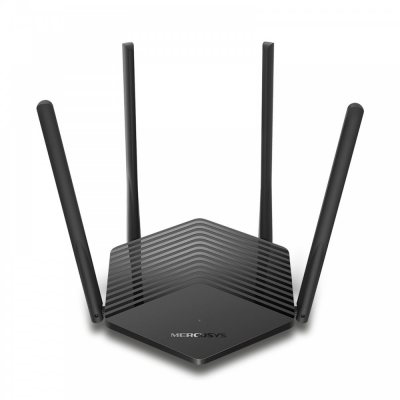


Mercusys Mercusys MR60X AX1500 Dual-Band Wi-Fi 6 Router Router · Wi-Fi 6 In stock· Online only
£41.99inc VAT£46.98 delivered
TP-Link RE200 AC750 Dual Band Wi-Fi Universal Wall-Plug Range Extender
+ £4.99 tracked delivery · £46.98 delivered Free delivery on orders over £150. One delivery charge per order.
In stock
Next-day delivery when you order by 3pm, Monday to Thursday. Orders after 3pm Thursday, or at the weekend, arrive on Tuesday. Not on bank holidays.
Limit of one of each item per order. Need more? Call us on 0161 820 1992.
4.9 on Google · 14-day returns · 0161 820 1992
From the manufacturer's information.
| Connection Type | Range Extender |
|---|---|
| Speed | 750Mbps |
| Access Point | Yes |
| Type | Range extender |
| Wi-Fi | Wi-Fi 5 |
In stock now and chosen to go with this part.
This description is supplied by TP-Link. Where it says "we" or "our", that means TP-Link, not Manchester PC.
Boosts wireless signal to previously unreachable or hard-to-wire areas flawlessly.
Creates a Mesh network by connecting to a TP-Link OneMesh router for seamless whole-home coverage.
Compatible with 802.11 b/g/n and 802.11ac Wi-Fi devices
Dual band speeds up to 750 Mbps
Miniature size and wall-mounted design make it easy to deploy and move flexibly
Ethernet port allows the Extender to function as a wireless adapter to connect wired devices
Place the RE200 between your wireless router and wireless devices, expanding WiFi coverage while eliminating WiFi dead zones. Enjoy a seamless wireless network throughout your home or office. The dual bands WiFi up to 750Mbps not only help extend to 2,000 sq.ft. (185 m2), but also make good use of your high ISP speed ? ideal for HD video streaming, online gaming and other bandwidth-intensive tasks.
The RE200?s Wireless AC technology create stronger WiFi connections across your home. Work with any standard router or access point, making it convenient to provide wide, non-dropping Dual Band WiFi to multiple devices.
With TP-Link Mesh Technology, it?s easy to form a Mesh network with a single WiFi name for seamless whole home coverage. Just connect RE200 to a OneMesh router. Always enjoy the strongest WiFi when you?re walking around with no need to search around for a stable connection.
Want a Mesh network Hesitate on whether to replace your existing router and buy a Mesh set?
TP-Link OneMesh resolves your dilemma.
Press the WPS button on your router and RE button on your RE200 within 2 minutes to easily connect to the network. Once connected with an existing router, you can simply relocate the RE200 at any location for the best signal strength.
Smart signal lights indicate the signal strength received from the existing router. Read the lights to find the best location for your RE200.
With an Ethernet port, RE200 can function as a wireless adapter to connect wired devices like desktop, gaming consoles, Blu-ray players, and Internet TVs. At the same time, the device can share the wireless network as well.
| WIRELESS | |
|---|---|
| Working Modes | Range Extender/Access Point |
| HARDWARE FEATURES | |
| Standards and Protocols | IEEE802.11ac,IEEE 802.11n, IEEE 802.11g, IEEE 802.11b |
| Plug Type | EU, UK, US, AU |
| Interface | 1 x 10/100Mbps Ethernet Port (RJ45) |
| Button | RE (Range Extender) Button, Reset Button |
| Input Power | 100-240V~50/60Hz |
| Max. Power Consumption | About 6.5W |
| Dimensions ( W x D x H ) | 4.3x 2.6 x 3.0in. (110.0 x 65.8 x 75.2mm) |
| Antenna | 3 x internal |
| WIRELESS FEATURES | |
| Wireless Standards | IEEE 802.11a/n/ac 5GHz, IEEE 802.11b/g/n 2.4GHz |
| Frequency | 2.4GHz & 5GHz |
| Signal Rate |
|
| Working Modes | Range Extender/Access Point |
| Reception Sensitivity | |
| 2.4G |
|
| 5G |
|
| Wireless Modes | Range Extender/Access Point |
| Wireless Functions | WMM (Wi-Fi Multimedia) |
| Wireless Statistic | Domain Login Function |
| Wireless Security |
|
| Transmission Power | < 20 dBm (EIRP) |
| Mesh Technology | OneMesh |
| OTHERS | |
| Certification | CE, FCC, RoHS |
| Package Content |
|
| System Requirements | Microsoft Windows 98SE, NT, 2000, XP, Vista or Windows 7, 8, 10, Mac OS, NetWare, UNIX or Linux. |
| Environment |
|


Want suggestions based on what you look at? (stays in your browser, switch off any time).

